Encryption and Decryption
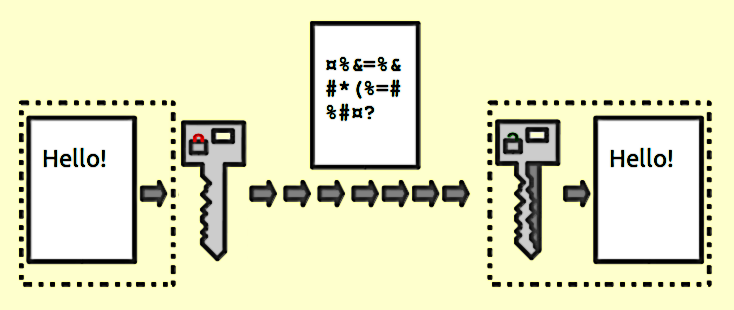
We have used Java Language , as it already has Inbuilt Encryption & Decryption methods , we also have used File handling part so as to make easy for file transfer .
Problem Statement :
If you search Data breach on google , the chances that you will get a lot of recent news about data breach happening in a lot of companies ,
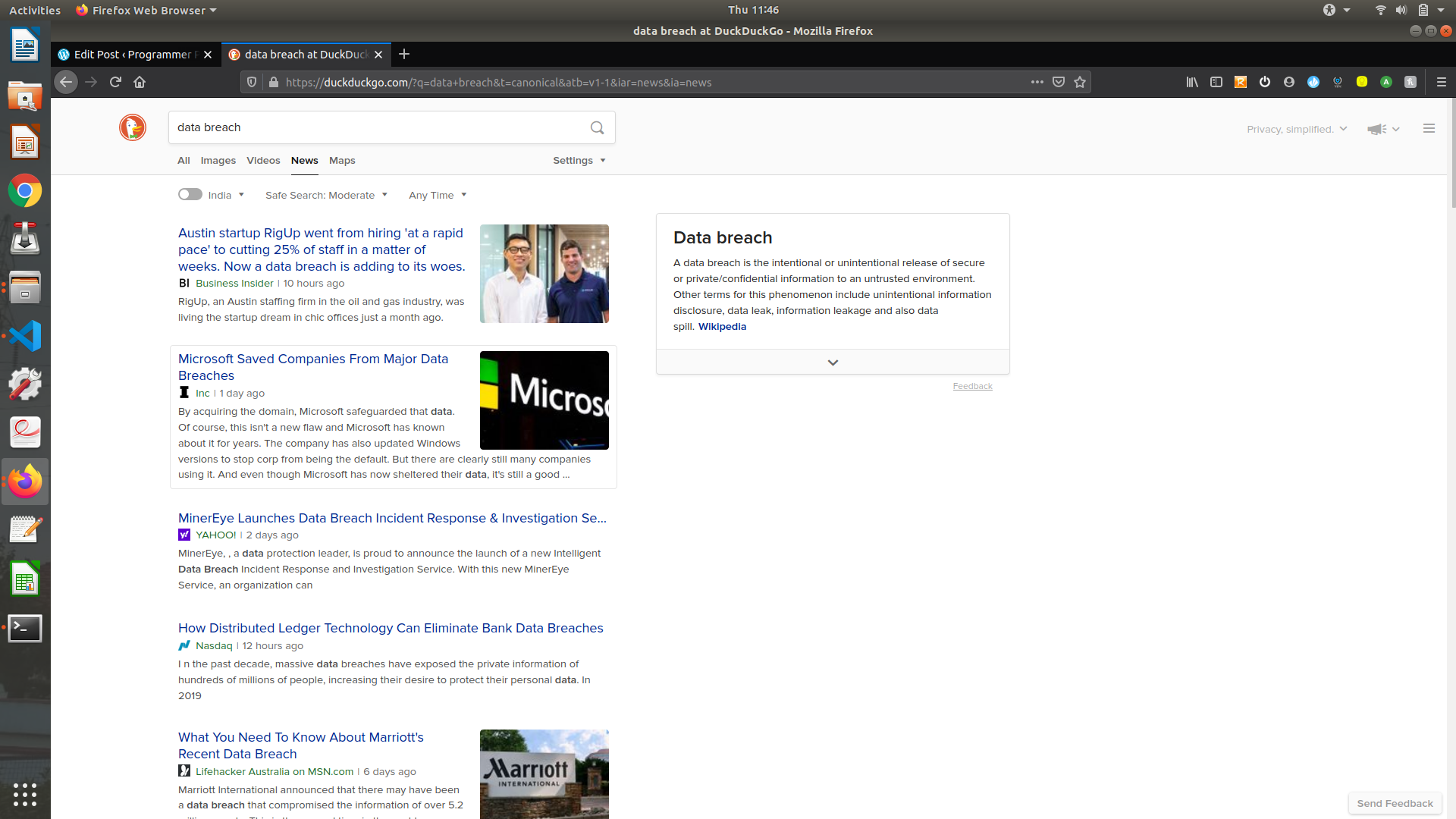
Just an example , All the news depict the data breach
Now our problem statement was how can we reduce this data breach . So we tried to transmit Encrypted files instead of normal text file , as if the file is intercepted then the intercepting party won’t understand the Encrypted file until they have the key/key’s . This way the text inside the Encrypted will stay safe from other parties , now if the intercepting party tries to decrypt the code forcefully with the key , then it’s gonna cost them a lot of computational power which further means more electricity and other resources .
Now there are two fall backs in this problem statement , 1. The sender party needs to have their own way of transferring Encrypted file to the receiving party . 2.The key should only be know to the sender and receiving party .
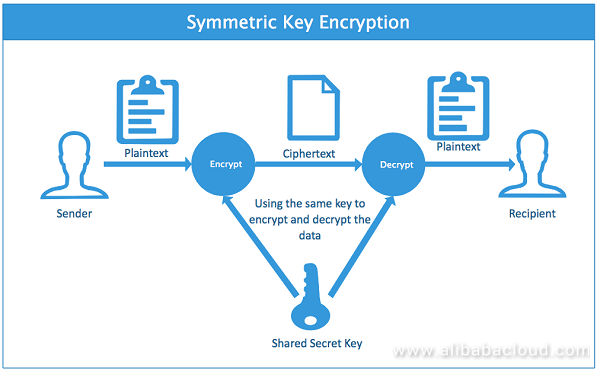
Explaining Encryption & Decryption:

Encryption, the process of encoding information in such a way that only the person (or computer) with the key can decode it and see the original information. Computer encryption is based on the science of cryptography(link to read more about it ), encrypting data was first done by Greeks , to protect information .
Decryption ,the process of taking encoded or encrypted text or other data and converting it back into text using the key , so that you or the computer can read and understand.
Key , a piece of information used in combination with an algorithm (a ‘cipher’) to transform plaintext into ciphertext (encryption) and vice versa (decryption).
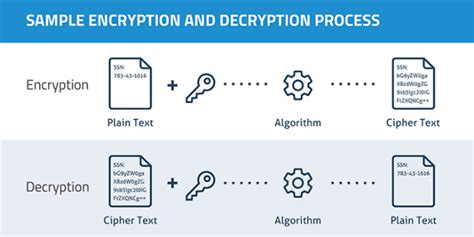
How it works
Now there is a difference in Encryption and Cipher , Encryption involves using crypto methods to encrypt data whereas Cipher is an algorithm.
Explaining 3 Most common Ciphers , i have used in this project :
1.Caesar Cipher :
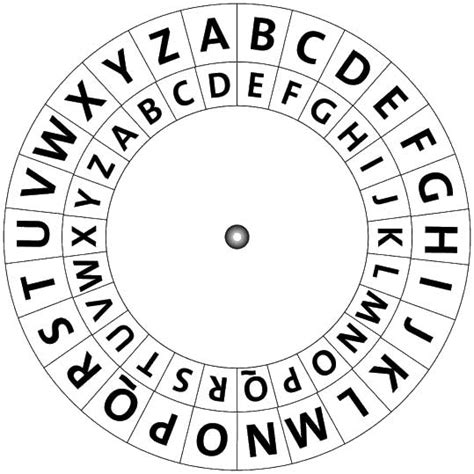
Also know as Shift Cipher , it is one of the oldest cipher’s being used .Concept of this cipher is based on the int key , all the characters are incremented by key value .
Encryption of cipher is based this formula , followed by code to implement the cipher.
[Image no longer available]
 public static void encrypt(String text, int key)
//text is the String to encrypt & key is keyword
    {
        StringBuffer result= new StringBuffer();

        for (int i=0; i<text.length(); i++)
        {
             //Case for Uppercase alphabets
            if (Character.isUpperCase(text.charAt(i)))
            {
                char ch = (char)(((int)text.charAt(i) +
                                  key - 65) % 26 + 65);
                result.append(ch);
            }
            //Case for Lowercase alphabets
            else
            {
                char ch = (char)(((int)text.charAt(i) +
                                  key - 97) % 26 + 97);
                result.append(ch);
            }
        }
        System.out.println("Encrypted Message = " + result);

    }
Decryption of cipher is based this formula , followed by code to implement the decipher .
[Image no longer available]
 public static void decrypt(String message, int key)
    {
        char ch;
        String decryptedMessage="";
		for(int i = 0; i < message.length(); ++i){
			ch = message.charAt(i);
			//for Lower case aplhabets
			if(ch >= 'a' && ch <= 'z'){
	            ch = (char)(ch - key);

	            if(ch < 'a'){
	                ch = (char)(ch + 'z' - 'a' + 1);
	            }

	            decryptedMessage += ch;
            }
            //for Upper alphabets
	        else if(ch >= 'A' && ch <= 'Z'){
	            ch = (char)(ch - key);

	            if(ch < 'A'){
	                ch = (char)(ch + 'Z' - 'A' + 1);
	            }

	            decryptedMessage += ch;
	        }
	        else {
	        	decryptedMessage += ch;
	        }
		}

		System.out.println("Decrypted Message = " + decryptedMessage);
	}
2.Vigenère cipher:
It is based entirely on Vigenère square ,the cipher as well decipher .Here the key is a String , which make it more difficult to decrypt ,

Assume the following terminology
- Ci – i-th character of the ciphertext
- Ti – i-th character of the open text
- Ki – i-th character of the key phrase (if the key phrase is shorter than the open text, which is usual, than the key phrase is repeated to math the length of the open text)
- m – length of the alphabet
For ciphering , we use this formula , to encrypt the open text, we have to sum together the first letters of the open text and key phrase, the second letters, third and so on. To encrypt the n-th letter of the open text (assume “L“) using the Vigenère square, we find the letter on the horizontal axis of the table and we find n-th letter of the key phase on the vertical axis (assume “T“). Followed by code to implement it ,
[Image no longer available: C_{i} \\equiv T_{i} + K_{i} \\pmod {m}]
public class VigenereCipher {
    /**
     * Encrypt using Vigenere cipher
     * @param s open text
     * @param key key phrase (only capital letters)
     * @return ciphertext (only capital letters)
     */
    public static String encipher(String s, String key){
        StringBuilder builder = new StringBuilder();
        for(int i = 0; i < s.length(); i ++){
            if(s.charAt(i) < 65 || s.charAt(i) > 90){ //ASCII character (capital letter)
                throw new IllegalArgumentException("" +
                        "Open text must contain only capital letters");
            }
            //add shift modularly
            char encyphered = s.charAt(i) + getShift(key, i) > 90 ? (char)((s.charAt(i) + getShift(key, i)) - 26) : (char)(s.charAt(i) + getShift(key, i));
            builder.append(encyphered);
        }
        return builder.toString();
    }
For deciphering , we use this formula , works the other way around. We find in the row corresponding to the n-th letter of the key phrase (“T”) a cell in which the n-th letter of the ciphertext (“E”) resides. Its column is denoted by the n-th letter of the open text (“L“). Followed by code to implement it ,
[Image no longer available: T_{i} \\equiv C_{i} - K_{i} \\pmod {m}]
public static String decipher(String s, String key){
        StringBuilder builder = new StringBuilder();
        for(int i = 0; i < s.length(); i ++){
            if(s.charAt(i) < 65 || s.charAt(i) > 90){ //ASCII character (capital letter)
                throw new IllegalArgumentException("" +
                        "Ciphertext must contain only capital letters");
            }
            //subtract shift modularly
            char decyphered = s.charAt(i) - getShift(key, i) < 65 ? (char)((s.charAt(i) - getShift(key, i)) + 26) : (char)(s.charAt(i) - getShift(key, i));
            builder.append(decyphered);
        }
        return builder.toString();
    }
    /**
     * Get shift
     * @param key key phrase
     * @param i position in the text
     * @return shift
     */
    private static int getShift(String key, int i) {
            if(key.charAt(i % key.length()) < 65 || key.charAt(i % key.length()) > 90){
                throw new IllegalArgumentException("" +
                        "Key phrase must contain only capital letters");
            }
        return ((int)key.charAt(i % key.length())) - 65;
    }
3.Affine cipher :
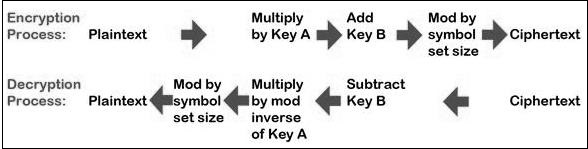
Assume the following terminology :
- Ci – i-th character of the ciphertext
- Ti – i-th character of the plaintext
- a – parameter a, gcd(a,m) = 1
- b – parameter b
- m – modulus (we usually choose a prime number, because then we can be sure, that gcd(a, m) = The prime modulus also maximizes the number of potential transformations
- a-1 – multiplicative inverse of a in Zm
Encryption of Affine Cipher algorithm , followed by code
[Image no longer available: C_{i} = a \\cdot T_{i} + b \\pmod{m}]
static String encrypt(String input , int firstKey, int secondKey) {
        StringBuilder builder = new StringBuilder();
        for (int in = 0; in < input.length(); in++) {
            char character = input.charAt(in);
            if (Character.isLetter(character)) {
                character = (char) ((firstKey * (character - 'a') + secondKey) % module + 'a');
            }
            builder.append(character);
        }
        return builder.toString();
    }
Decryption of Affine Cipher algorithm , followed by code
[Image no longer available: T_{i} = (C_{i} \\; - \\; b) \\cdot a^{-1} \\pmod{m}]
static String decrypt(String input ,int firstKey, int secondKey) {
        StringBuilder builder = new StringBuilder();
        // compute firstKey^-1 aka "modular inverse"
        BigInteger inverse = BigInteger.valueOf(firstKey).modInverse(BigInteger.valueOf(module));
        // perform actual decryption
        for (int in = 0; in < input.length(); in++) {
            char character = input.charAt(in);
            if (Character.isLetter(character)) {
                int decoded = inverse.intValue() * (character - 'a' - secondKey + module);
                character = (char) (decoded % module + 'a');
            }
            builder.append(character);
        }
        return builder.toString();
    }
4. AES Encryption & Decryption :
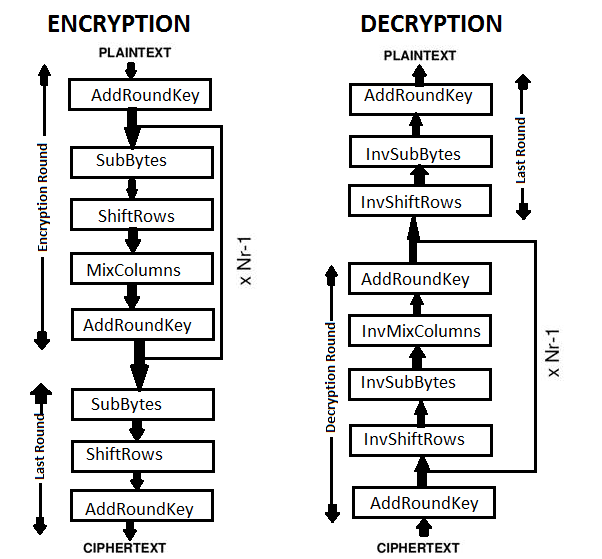
It comprises of a series of linked operations, some of which involve replacing inputs by specific outputs (substitutions) and others involve shuffling bits around (permutations).
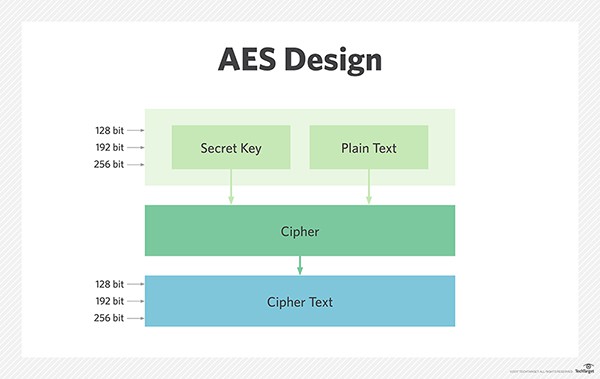
Encryption : It is divided into 7 abstract parts , there is a lot of math going under the hood which we will no the considering .
- Data is divided into blocks : You String is separated into blocks , each block is of 128 bits/8 bytes ,it separates the data into a four-by-four column of sixteen bytes.
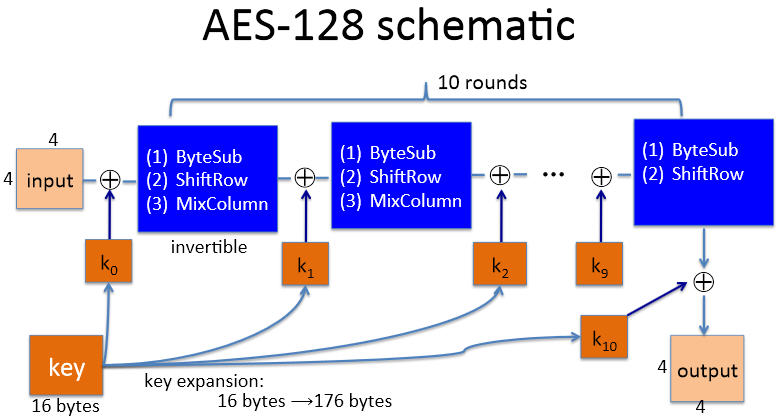
- key expansion : initial key is used to come up with a series of other keys for each round of the encryption process , using Rijndael’s key schedule, which is essentially a simple and fast way to produce new key ciphers.
- Add round key : our initial key is added to the block of our message , using XOR cipher, which is an additive encryption algorithm. All the transaction are done in binary.
- Substitute bytes : each byte is substituted according to a predetermined table ,table can be accessed by the algorithm .
- Shift rows & Mix Columns: This seems random ,but each column has a mathematical equation applied.
- Add round key :we take our result and add the first round key
- Further Complicated stuff :
Encryption Procedure :
- Key expansion
- Add round key
- Byte substitution
- Shift rows
- Mix columns
- Add round key : x 9, 11 or 13 times, depending on whether the key is 128, 192 or 256-bit
- Byte substitution Shift rows Add round key
 public static String encrypt(String strToEncrypt, String secret)
    {
        try
        {
            setKey(secret);
            Cipher cipher = Cipher.getInstance("AES/ECB/PKCS5Padding");
            cipher.init(Cipher.ENCRYPT_MODE, secretKey);
            return Base64.getEncoder().encodeToString(cipher.doFinal(strToEncrypt.getBytes("UTF-8")));
        }
        catch (Exception e)
        {
            System.out.println("Error while encrypting: " + e.toString());
        }
        return null;
    }
Decryption Procedure:
- Inverse add round key
- Inverse shift rows
- Inverse byte substitution
- Inverse add round key
- Inverse mix columns
- Inverse shift rows
- Inverse byte substitution : x 9, 11 or 13 times, depending on whether the key is 128,192 or 256-bit
- Inverse add round key
 public static String decrypt(String strToDecrypt, String secret)
    {
        try
        {
            setKey(secret);
            Cipher cipher = Cipher.getInstance("AES/ECB/PKCS5PADDING");
            cipher.init(Cipher.DECRYPT_MODE, secretKey);
            return new String(cipher.doFinal(Base64.getDecoder().decode(strToDecrypt)));
        }
        catch (Exception e)
        {
            System.out.println("Error while decrypting: " + e.toString());
        }
        return null;
    }
For more information , open this link : https://www.comparitech.com/blog/information-security/what-is-aes-encryption/
5.Blogfish Encryption & Decryption:
Blowfish is a 16-round Feistel cipher. It’s block size is 64-bit and key sizes range from 32 to 448 bit.Encryption with Blowfish has two main parts : 16 iterations of round method and output operation . Best thing about it is , open source algorithm .
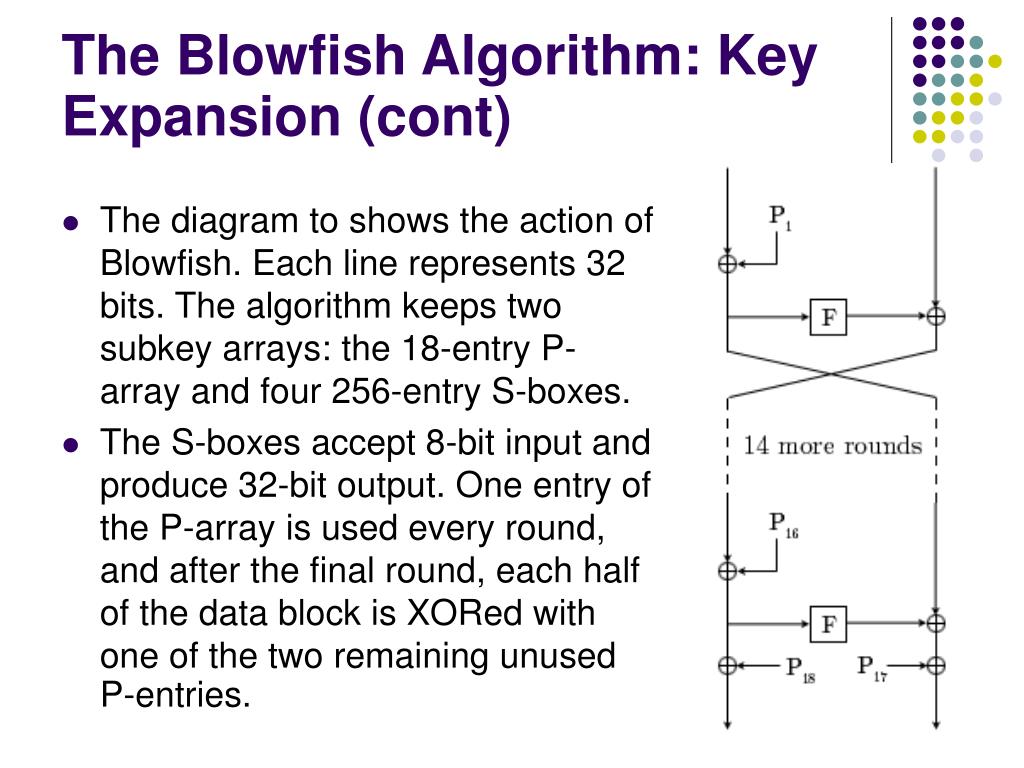
- So understand first that our key is made into 18 sub keys,this is know as key expansion.They are called p arrays
- Original boxes are made up of original key
- Value stored in pi array += XOR (i th 32 bits of key )
It is based of Feistel cipher , it means it divides the string into 2 parts , Left & Right , This process is done 18 time’s , as seen below :
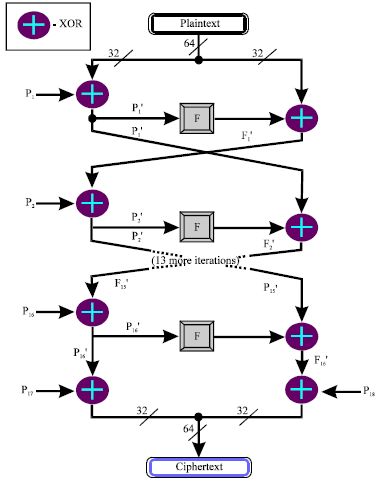
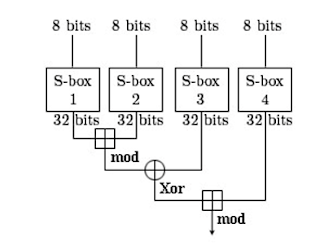
Now the question here is , what is F . F is Block S block , which takes in 8 bit and returns 32 bits , as shown below :
Our Code snippet for is
public static void Blowfish_Cipher(File inputFile, File outputFile,String key)throws Exception {
        try {

            BlowfishdoCrypto(Cipher.ENCRYPT_MODE, inputFile, outputFile,key);
            System.out.println("Blowfish Cipher applied Succesfully");
        }
        catch (Exception e) {
            System.out.println("\n Error at reading file from original file in Blowfish Cipher");
            e.printStackTrace();
        }
    }

public static void Blowfish_Decipher(File inputFile, File outputFile,String key) throws Exception {
        try {

            BlowfishdoCrypto(Cipher.DECRYPT_MODE, inputFile, outputFile,key);
	    	System.out.println("Blowfish Decipher applied Succesfully");

        } catch (Exception e) {
            System.out.println("\n Error at reading file from encrypted file in Blowfish Decipher");
            e.printStackTrace();

        }
    }
So to sum up Blowfish , we can use this image
[Image no longer available]
For further information , you can check
- https://www.commonlounge.com/discussion/d95616beecc148daaa23f35178691c35
- https://www.youtube.com/watch?v=HiKuC96b5cw
- https://www.youtube.com/watch?v=QYPqWGOMKdg
6. DES Encryption & Decryption
Although its short key length of 56 bits makes it too insecure for modern applications, it has been highly influential in the advancement of cryptography.The value permuted by changing the location of bits ,
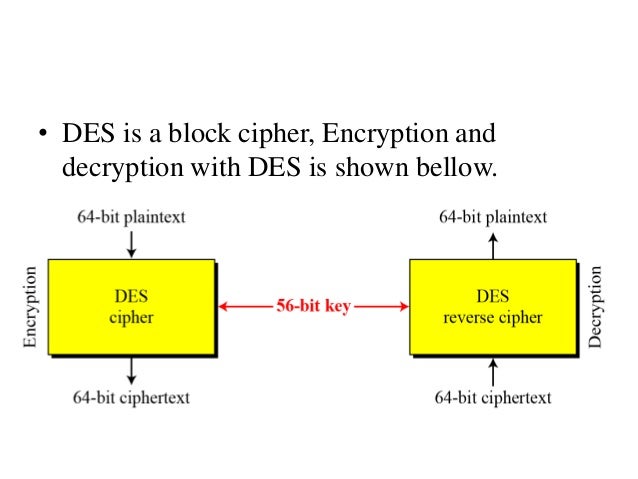
Out of 64 bit input but after applying permuted choice the 56 bits are left , which are then applied to Left Circular Operation then produces 48 bits ,procedure is continued for 16 rounds
[Image no longer available]
Perform 32 bit Swap of right and left , then apply inverse Initial permutation . At S block 48 bits are converted into 32 bits for permutation , Li becomes Ri-1 & Ri becomes Li-1,
[Image no longer available]
Expansion table :32 bits converted into 48 bits , 32 bits are divided into blocks and each block contain 4 bits , block size becomes 6 bits .
It happens as shown below
[Image no longer available]
S box : 32 bits , 8 boxes names as Si boxes , each S block contains 16 columns. It is primarily used to store row and column numbers, in bits format for the algorithm.
1.DES Encryption:
- Create a key
- Create an instance
- Convert text into Byte [] array
- Encrypt it
 public static void DES_Encrypt(String key, InputStream is, OutputStream os) throws Throwable {
        try {

            encryptOrDecrypt(key, Cipher.ENCRYPT_MODE, is, os);
            System.out.println("DES Encryption Done");
        } catch (Exception e) {
            System.out.println("Error at Reading original.txt");
        }
    }
2.DES Decryption
- Create a key
- Create an instance
- Convert text into Byte [] array
- Decrypt it
 public static void DES_Decrypt(String key, InputStream is, OutputStream os) throws Throwable {
        try {
            encryptOrDecrypt(key, Cipher.DECRYPT_MODE, is, os);
            System.out.println("DES Decryption Done");
        } catch (Exception e) {
            System.out.println("Error at Reading encrypted.txt");

        }

    }
For encryption depth :
Resources Used:
- https://www.geeksforgeeks.org/blowfish-algorithm-with-examples/
- https://medium.com/codeclan/what-are-encryption-keys-and-how-do-they-work-cc48c3053bd6
- /https://www.comparitech.com/blog/information-security/what-is-aes-encryption/
- https://docs.microsoft.com/en-us/dotnet/api/system.security.cryptography.aes?view=netframework-4.8
- https://www.programming-algorithms.net/
- https://docs.microsoft.com/en-us/dotnet/standard/security/generating-keys-for-encryption-and-decryption
- https://docs.microsoft.com/en-us/dotnet/standard/security/decrypting-data
- https://mkyong.com/java/jce-encryption-data-encryption-standard-des-tutorial/
Github Code :https://github.com/kakabisht/Encrytion-Decryption